 Sora
Sora
Keep every coding thread within reach.
A native macOS workspace for supervising agents and shipping their work. Spaces keep related terminals, repositories, files, diffs, and browser tabs together — without turning the terminal into a side panel.
Free, no telemetry, no subscription.
brew install ankitchouhan1020/tap/sora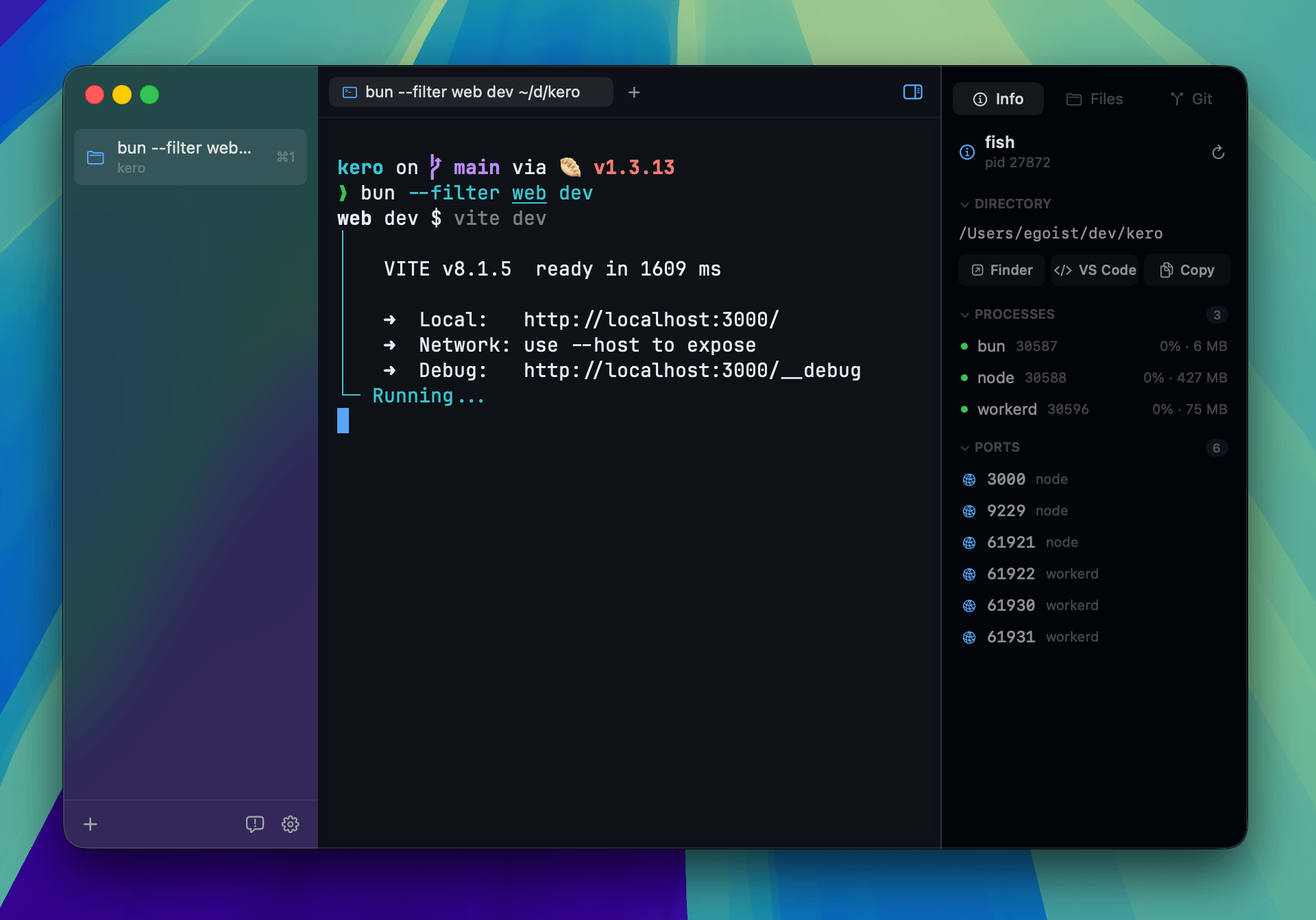
Features
spaces & work
- Spaces follow the goalkeep related terminals, files, and repositories together even when the work crosses repo boundaries
- Your order stays yourspin the threads you return to; temporary inspections stay below without moving or renaming your work
- Switch without losing placeclick, press Cmd+1–9, or swipe across the sidebar to move between Spaces with every tab intact
- Split when it helpsCmd+D splits right, Cmd+Shift+D splits down, and terminal links open in file or browser tabs and panes
- Restored on relaunchSpaces, tabs, and pane layouts return; each shell opens fresh beneath its restored scrollback
- Command paletteCmd+P to jump to any Space, tab, session, or command
review & ship
- Git panelstage, unstage, discard, commit, fetch, pull, push, stash, and inspect diffs beside the shell
- Inline diffsclick a changed file to read its diff in place, without leaving the window
- Branch workswitch or create a branch, fetch, fast-forward pull, push, publish a new upstream, or stash
- Files panelbrowse the working tree with Git status badges, open a file, edit with tree-sitter highlighting, Cmd+S to save
- Beads and session inforeview project tasks, plus the processes and TCP ports running under the selected session
local automation
- Bundled sora commandcoordinate Spaces, pinned or temporary tabs, panes, and agent conversations from one CLI
- Visible by designautomated commands run in ordinary Sora tabs, where you can watch, inspect, or take over
- Local and controllableenabled by default, easy to switch off, and secured through a signed helper on a private per-user socket
the terminal itself
- Your shell, unchangedzsh, fish, or bash exactly as you configured it — prompt, aliases, dotfiles and all
- Terminal backendsGhostty's terminal core by default, with an optional Alacritty backend
- Desktop notificationsbells and long-running commands reach Notification Center; click an alert to return to its session
- Progress reportsOSC 9;4 progress shows as a slim bar above the terminal, error and pause states included
- Fonts and themesships with JetBrains Mono, Nerd Font symbols, CJK font support, and shared app themes
- Quiet updatessigned, notarized builds check in with Sparkle and install in the background
Shortcuts
- Cmd+Nnew Space
- Cmd+Tnew terminal
- Cmd+Wclose the focused pane
- Cmd+1–9switch Space
- Ctrl+1–9switch tab
- Ctrl+Tabopen the tab switcher
- Cmd+Pcommand palette
- Cmd+D / Cmd+Shift+Dsplit right / split down
- Opt+Cmd+arrowsfocus the pane in that direction
- Cmd+[ / Cmd+]cycle pane focus
- Cmd+Shift+Returnzoom the focused pane
- Ctrl+Cmd+arrows / =resize / equalize panes
- Cmd+B / Cmd+Shift+Btoggle the left / right sidebar
- Cmd+Shift+G / E / Igit / files / info panel
- Cmd+F / Cmd+Gfind / find next
- Cmd+Kclear the terminal
- Cmd+Ssave the open file
FAQ
Is Sora free?
Yes. Free to download, no subscription, no account.
Does it replace my shell?
No. Sora hosts the shell you already run and leaves your prompt, aliases, and dotfiles untouched. The terminal underneath is libghostty, the same core as Ghostty.
Does it collect any data?
No telemetry, no analytics. The only network call Sora makes is the update check against releases.ankitchouhan.dev.
Can coding agents control Sora?
Yes. Use the bundled sora command; local automation can be disabled in Settings. Commands stay visible in normal terminal tabs, and no network port or background daemon is opened.
What happens to my sessions when I quit?
Spaces, tabs, and pane layouts come back on relaunch. Each terminal reopens as a fresh shell in its old directory, with the previous scrollback restored above a "Session Contents Restored" divider.
Is this an IDE?
No — the terminal stays the center of gravity. The git and files panels exist so you can review and ship what happens in the terminal without switching to an editor.